Keychron Q5 Pro: For Someone Who Has Stopped Compromising
The Q5 Pro is a 96% layout wireless mechanical keyboard with a double-gasket-mounted aluminium body, QMK/VIA support, and a retail price of around £190 depending on switch…
 ReaperX
·
13 May, 2026
·
3 min read
ReaperX
·
13 May, 2026
·
3 min read
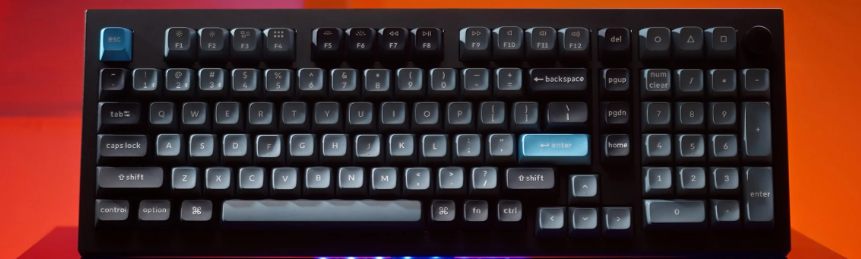
The Q5 Pro is a 96% layout wireless mechanical keyboard with a double-gasket-mounted aluminium body, QMK/VIA support, and a retail price of around £190 depending on switch choice. It is aimed specifically at the person who has bought three keyboards in four years and is trying to stop. Whether it succeeds depends almost entirely on whether you have found the switch you actually want, because everything else about the build is as resolved as this category gets at this price.
The 96% layout keeps the numpad and compresses the right-side cluster home, end, page up, page down into a column directly adjacent to the main board. You lose nothing functional and gain a considerably smaller footprint than a full-size board. The tradeoff is that the home cluster position takes adjustment time if you are coming from anything smaller. Muscle memory recalibrates in about a week. After that, the layout disappears.
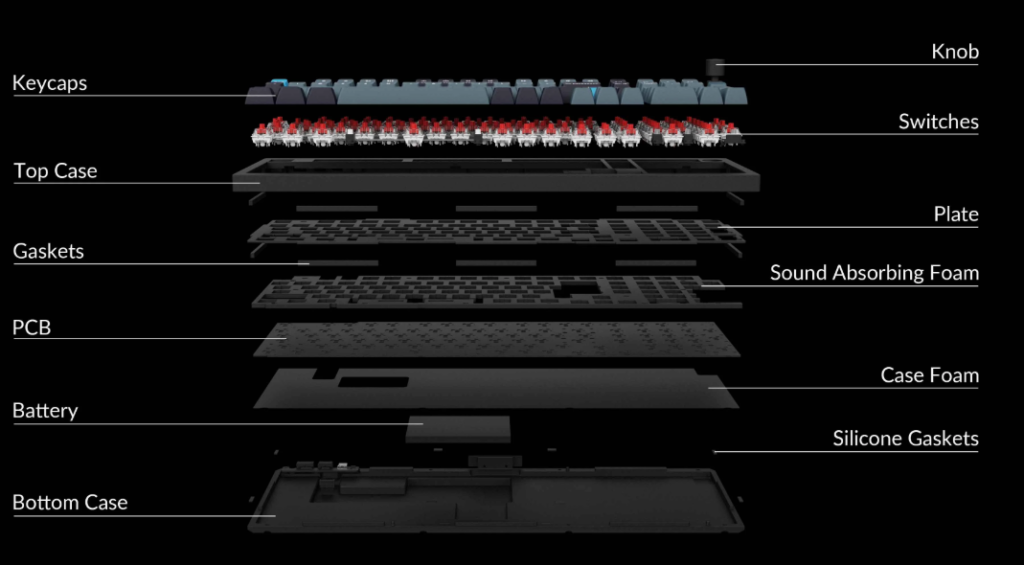
The double-gasket design is the primary structural differentiator from Keychron’s wired Q-series boards. Silicone gaskets sit between the plate and case on both sides, and additional silicone pads reduce resonance between the top and bottom metal housings. The typing feel is noticeably softer than a top-mounted design at the same price point, and the sound profile is correspondingly muted. With Keychron K Pro Brown switches (the test configuration), the board sits at approximately 55 to 58 dB at a normal typing pace, quiet enough for an open-plan office.
Wireless performance over Bluetooth 5.1 is reliable within a four-metre range. The Q5 Pro connects to up to three devices and switches between them cleanly. There is no 2.4GHz dongle option on this model, that feature is reserved for the Q5 Max. If sub-1ms wireless latency for competitive gaming is a requirement, the Q5 Pro is not the board. For typing and general use, Bluetooth 5.1 at 90Hz polling is imperceptible. Keychron rates battery life at 100 hours at the lowest brightness setting and up to 300 hours without lighting.
The QMK/VIA support means the key layout, lighting behaviour, and macro assignments are fully remappable without proprietary software. The Keychron Launcher is browser-based, works in Chrome or Edge, and requires no download. Remapping a key takes under thirty seconds. This is a real advantage over boards that require a dedicated app with a cloud account.
What does not work as well:
The stabilisers on the spacebar and left shift are pre-lubed from the factory and adequate, but anyone who cares about rattle will want to pull them and re-lube. The south-facing RGB LEDs produce uneven shine-through compared to north-facing LEDs, with partial brightness visible at mid-level lighting, invisible at full brightness or off. The USB-C port placement on the top-left rear is awkward if your cable runs from the left side of the desk. The KSA profile keycaps are not shine-through, so RGB is reflected from below rather than transmitted through the legends. Fine, but worth knowing before you buy.
The Q5 Pro is not for someone buying their first mechanical keyboard. The price is too high, the switch decision is too important to get right on a first attempt, and the configuration depth is wasted on someone who does not know what they want from it. For someone who has reached a clear answer on layout, switch weight, and wireless requirements and does not need 2.4GHz it is the most resolved board available at this price.
Verdict:
Buy it, with your preferred switch chosen before you order. If you need 2.4GHz wireless for competitive gaming, look at the Q5 Max instead.
Take a look: keychron Q5 Pro (not an affiliate link)